
The Acer Aspire 3D 15 SpatialLabs Edition is a 15.6-inch laptop that shows 3D images without glasses. It uses an Intel Core i7-13620H, an NVIDIA RTX 4050 and a 4K screen that can switch between normal 2D and stereoscopic 3D. It is a great fit for 3D designers, students of 3D modelling and anyone who wants to watch 3D content at home. But it is not the best pick if you mainly want a gaming laptop, even though some stores sell it with “Gaming Laptop” in the name.
This guide explains how the 3D screen works, the full specs, what reviewers found about battery life and heat, which 3D games really work, and who should buy it.
As an Amazon Associate, SearchingNew earns from qualifying purchases.

Quick answer: what is the Acer Aspire 3D 15 SpatialLabs Edition?
- What it is: a glasses-free 3D laptop for 3D viewing, 3D design and 2D-to-3D video.
- Model number: A3D15-71GM.
- Main parts: Intel Core i7-13620H, NVIDIA GeForce RTX 4050 (6 GB), 16 GB DDR5, 1 TB SSD (most common configuration).
- Screen: 15.6-inch 4K IPS, 60Hz. 3D mode runs at 1920 x 2160.
- Best for: 3D artists, architects, product designers, teachers, developers working in Unity or Unreal, and people who enjoy 3D movies.
- Not ideal for: competitive gamers, people who need long battery life, or anyone who gets headaches from 3D.
How the glasses-free 3D screen works
Normal 3D TVs needed special glasses. The Aspire 3D 15 does it differently. A special optical lens layer sits on top of the screen, and cameras above the display follow your eyes. The laptop then sends a slightly different image to each eye. Your brain joins the two images, and you see depth, as if objects are coming out of the screen or sinking behind it. Acer calls this technology SpatialLabs.
There are two things to know before you buy:
- 3D mode is lower resolution. Acer says the screen shows 4K (3840 x 2160) only for 2D content. In 3D mode, each image is 1920 x 2160, because the screen is split between your left and right eye.
- It is a one-person screen. The eye tracking follows one viewer. A detailed review by ITC found that 3D works best when only one person sits in front of the camera, with nobody moving in the background. Friends looking over your shoulder will not get the same effect.

Acer Aspire 3D 15 SpatialLabs Edition specifications
These are the specs of the A3D15-71GM model sold on Amazon India and in Acer’s US store. Some regions also sell a cheaper version with a Core i5-13420H and RTX 2050, so always check the exact model before you pay.
| Part | Acer Aspire 3D 15 SpatialLabs Edition (A3D15-71GM) |
|---|---|
| Processor | Intel Core i7-13620H, 10 cores, up to 4.9 GHz |
| Graphics | NVIDIA GeForce RTX 4050 Laptop GPU, 6 GB GDDR6 |
| Memory | 16 GB DDR5 (Acer lists up to 32 GB) |
| Storage | 1 TB PCIe NVMe SSD (up to 2 TB) |
| Display | 15.6-inch UHD 4K (3840 x 2160) IPS, 60Hz, 100% Adobe RGB, stereoscopic 3D module |
| 3D mode resolution | 1920 x 2160 |
| Ports | 1 x Thunderbolt 4 (USB-C), 3 x USB-A, HDMI 2.1, Ethernet (RJ-45), audio jack |
| Wireless | Wi-Fi 6, Bluetooth |
| Webcam | 720p, plus eye-tracking cameras for 3D |
| Battery | 57 Wh, 135 W charger |
| Weight | 2.32 kg (5.11 lb) |
| Size | About 36.3 x 23.9 x 2.5 cm (14.3 x 9.4 x 0.97 in) |
| Operating system | Windows 11 Home or Pro, depending on region |
| Keyboard | Backlit, with number pad |

SpatialLabs apps: what you can actually do in 3D
The 3D screen is only useful if you have 3D content. The laptop comes with Acer’s SpatialLabs Experience Center Pro, which includes these apps:
- SpatialLabs Go: uses AI to turn normal 2D photos, videos and even YouTube into 3D in real time. This is the app most people will use every day.
- SpatialLabs Player: plays side-by-side 3D videos and lets you switch between 2D and 3D.
- SpatialLabs Model Viewer Pro: opens 3D models and CAD files so you can look at them in real 3D. Useful for checking a product design or a building model before showing it to a client.
- Developer tools: plug-ins for Unity and Unreal Engine, plus Acer’s OpenXR runtime. Acer says OpenXR apps such as Blender, Autodesk VRED and Twinmotion can work with SpatialLabs.
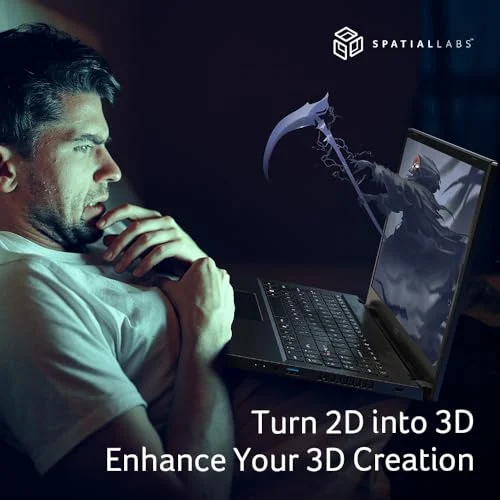
Practical example: an interior designer can build a room in Blender or Twinmotion, then show it on this laptop in 3D during a client meeting. The client sees real depth without wearing a headset. That is the kind of job this laptop is made for.
Is the Acer Aspire 3D 15 a good gaming laptop?
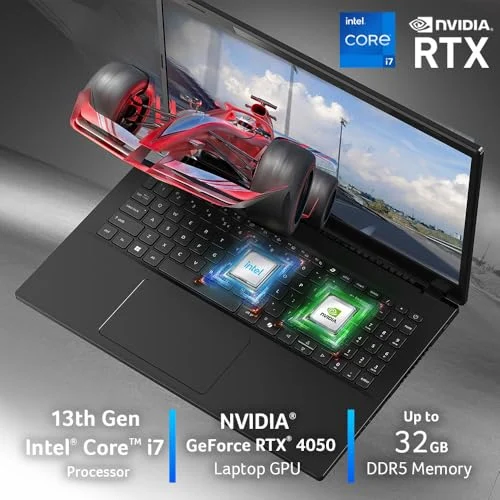
This is the biggest gap in most listings, so here is the honest answer. In normal 2D, it plays games like any RTX 4050 laptop. ITC’s review found the RTX 4050 could run games at high settings in 4K with NVIDIA DLSS set to Performance, but the 6 GB of video memory became a limit when frame generation was turned on. The screen is also only 60Hz, while most gaming laptops at this price have 144Hz or faster screens. That makes it a poor choice for fast online shooters.
3D gaming is the confusing part. Acer’s 3D game tool is called SpatialLabs TrueGame. On Acer’s official SpatialLabs page, TrueGame is listed for the Predator 3D laptops and monitors, but not for the Aspire 3D 15, which gets Experience Center Pro instead. Some owners on Acer’s community forum have reported that TrueGame is missing on their Aspire 3D 15. An early review unit did run supported games in 3D (ABZU and A Plague Tale: Innocence looked great, while Forza Horizon 5 showed doubled text), but you should not buy this laptop expecting a full 3D game library.
Bottom line: if 3D gaming is your main goal, look at the Predator Helios 3D 15 SpatialLabs Edition instead. If you want a normal gaming laptop, a regular RTX 4050 or RTX 5050 laptop with a fast screen gives you more for less money.
Battery life, heat and fan noise
Acer does not publish a battery life figure for this laptop. ITC tested it and measured:
| Test (ITC review) | Result |
|---|---|
| Office work | 4 h 27 min |
| 4K YouTube playback | 4 h 14 min |
| Gaming (Forza Horizon 5, full brightness) | About 1 h 20 min |
| Charging 10% to 80% | 50 min |
| Charging to 100% | 1 h 24 min |
Performance also drops a lot on battery. In the same review, the Blender GPU score fell from 2513 when plugged in to 615 on battery, and multi-core CPU scores were roughly halved. So keep the charger connected for rendering, 3D work or games.
For cooling, Acer uses two fans and three copper heat pipes. Under a 30-minute stress test, ITC saw the CPU reach 74°C and the GPU hotspot reach 89°C, with fan noise of 50 to 55 dB. The fans can also spin up during light office work.
Does 3D cause eye strain?
It can, especially at the start. The ITC reviewer had headaches and dizziness in the first 30 minutes, and these mostly went away by the second day. Other reviewers of Acer’s SpatialLabs laptops also mentioned eye strain after an hour of 3D gaming. Everyone reacts differently. If possible, try a SpatialLabs demo in a store before buying, and take short breaks when using 3D for long periods. You can always switch back to normal 2D, where the 4K screen works like any other laptop display.
Pros and cons
What is good
- Real glasses-free 3D that works well with supported apps and models
- Sharp 4K screen with 100% Adobe RGB for photo and design work in 2D
- 2D-to-3D conversion for photos, videos and YouTube
- Unity, Unreal and OpenXR support for developers
- Good port selection with Thunderbolt 4, HDMI 2.1 and Ethernet
What is not so good
- Expensive for an i7 + RTX 4050 laptop
- 60Hz screen is weak for gaming
- TrueGame 3D gaming is not listed for this model
- Short battery life and big performance drop on battery
- 3D works for one viewer only, and may cause discomfort for some people
- Basic 720p webcam and a plastic body that picks up fingerprints
Aspire 3D 15 vs other options
| Option | 3D screen | 3D gaming (TrueGame) | Best for |
|---|---|---|---|
| Acer Aspire 3D 15 SpatialLabs Edition | Yes, 15.6-inch 4K | Not listed by Acer | 3D design, 3D viewing, developers |
| Acer Predator Helios 3D 15 SpatialLabs Edition | Yes, 15.6-inch 4K | Yes | 3D gaming with up to Core i9-13900HX and RTX 4080 |
| Regular RTX 4050 gaming laptop (for example ASUS TUF Gaming F16) | No | No | Normal gaming with a faster screen at a lower price |
| Acer SpatialLabs View Pro portable 3D monitor | Yes, external | Not listed | Adding 3D to a PC you already own |
If you are mainly shopping for games, our guide to the best gaming laptops in India and our Acer Predator Helios Neo 14 review cover better-value choices.
Price and availability
Acer launched the Aspire 3D 15 SpatialLabs Edition at CES in January 2024. It started at $1,399.99 in North America and €1,499 in Europe. In India, the i7 + RTX 4050 + 16 GB + 1 TB model (A3D15-71GM) is sold on Amazon, and Flipkart also lists a cheaper Core i5 + RTX 2050 version. Prices change often, so use the button below to see the current price and offers.
Buying tip: the i5 + RTX 2050 version costs less, but the 4K 3D screen needs a strong graphics card. ITC’s reviewer also felt the cheaper version was poor value. If you buy this laptop, the RTX 4050 model is the one to get.
How to get started with 3D on the Aspire 3D 15
- Update everything first. Run Windows Update, then check Acer’s support page for your model (A3D15-71GM) for the latest SpatialLabs Experience Center Pro and graphics drivers.
- Plug in the charger. 3D and rendering are much slower on battery.
- Sit in the right spot. Sit straight in front of the screen at a normal working distance, in good light, with nobody else in view of the cameras.
- Start with SpatialLabs Go. Open a photo or a YouTube video and turn on 3D. This is the easiest way to see what the screen can do.
- Try your own models. Import a 3D model or CAD file into Model Viewer Pro, or install the Unity or Unreal plug-in if you build 3D apps.
- Use it in short sessions at first. Give your eyes a day or two to get used to 3D.
Common problems and fixes
The 3D effect keeps breaking or looks doubled
The eye-tracking cameras may be losing your face. Clean the camera area above the screen (the tight hinge can leave fingerprints there), improve the room lighting, and make sure only one person is in front of the laptop. Some apps and games simply show doubled text in 3D. Switch those back to 2D.
Eye-tracking or webcam not detected
Check that camera access is turned on in Windows Settings > Privacy & security > Camera, and reinstall the SpatialLabs software from Acer’s support site. Our guide on laptop camera not working in Windows 11 covers more fixes.
TrueGame is missing
This is expected. Acer’s official software list gives the Aspire 3D 15 the Experience Center Pro suite, and TrueGame is listed for Predator SpatialLabs devices. Contact Acer support if you were promised 3D gaming by a seller.
The laptop is slow on battery
That is normal for this model. Plug in for heavy work. For daily use, close apps you do not need and see our tips to fix a slow laptop on Windows 11.
Fans are loud
Pick a quieter performance mode in the AcerSense app for light work, keep the vents clear, and use the laptop on a hard, flat surface rather than a bed or sofa.
Who should buy it, and who should skip it
Buy it if you:
- Work with 3D models, CAD, architecture or product design
- Build apps in Unity or Unreal and want to test stereoscopic 3D
- Want to show 3D work to clients without a VR headset
- Enjoy 3D movies and 2D-to-3D photos and videos
Skip it if you:
- Mainly want a gaming laptop
- Need all-day battery life for college or travel
- Want the most performance for your money
- Get motion sickness or headaches easily
Frequently asked questions
Do you need 3D glasses for the Acer Aspire 3D 15 SpatialLabs Edition?
No. It uses an optical lens layer on the screen and eye-tracking cameras to send a different image to each eye, so you see 3D without glasses.
What is the 3D mode resolution of the Aspire 3D 15?
Acer says the screen shows 4K (3840 x 2160) for 2D content, while 3D content is shown at 1920 x 2160.
Can the Acer Aspire 3D 15 play games in 3D?
It plays games normally in 2D with its RTX 4050. For 3D games, Acer lists its TrueGame software for Predator SpatialLabs devices, not for the Aspire 3D 15, so do not buy it mainly for 3D gaming.
Can two people watch 3D at the same time?
Not properly. The eye tracking follows one viewer, and reviewers found 3D works best with only one person in front of the camera.
What is the battery life of the Acer Aspire 3D 15?
Acer does not list a battery life figure. In ITC’s tests, it lasted about 4 h 27 min for office work, 4 h 14 min for 4K video and about 1 h 20 min while gaming.
Is the Acer Aspire 3D 15 SpatialLabs Edition worth buying?
Yes, if you work with 3D models or want glasses-free 3D for viewing and presenting. No, if you mainly want a gaming laptop or long battery life, because regular RTX laptops give better value for those needs.
Acer Aspire 3D 15 SpatialLabs Edition: final verdict
The Acer Aspire 3D 15 SpatialLabs Edition is one of the few laptops that gives you real glasses-free 3D, and it does that job well. For 3D designers, developers and anyone who presents 3D work, it is a unique tool with a sharp 4K screen and enough power for most 3D tasks. As a gaming laptop, it makes less sense: the 60Hz screen, short battery life and missing TrueGame support mean a normal RTX laptop is better value. Buy it for the 3D, not for the games.
Sources
- Acer: Aspire 3D 15 SpatialLabs Edition product page
- Acer: SpatialLabs software and supported devices
- Acer newsroom: launch announcement (January 2024)
- ITC: Aspire 3D 15 SpatialLabs Edition review with battery and thermal tests