
Claude advanced tool use is a set of three features that help Claude work with many tools without wasting its memory (context window) or making mistakes. They are the Tool Search Tool, Programmatic Tool Calling and Tool Use Examples. If you are building an AI agent, a chatbot or an automation with the Claude API, these features can cut token usage and make tool calls more accurate.
This guide explains each feature in plain English, shows short code examples, and tells you when to use each one and when to skip it. No deep coding background is needed to follow the ideas.
What is tool use in Claude?
Before we get to the “advanced” part, let’s be clear on the basics. Tool use (also called function calling) lets Claude call functions that you define, like “get order status” or “search the database”. You describe each tool with a name, a description and an input format (a JSON schema). When a user asks something, Claude decides whether a tool would help, asks your app to run it, reads the result and then answers.
This works well with a handful of tools. The trouble starts when you connect many tools, for example several MCP servers (MCP is a standard way to plug apps like GitHub, Slack or Google Drive into an AI). Every tool’s definition is sent to Claude on every request, and every tool result is pushed back into the conversation. That eats tokens fast and confuses tool selection.
If you are new to Claude itself, our Claude AI review covers the plans and what the app can do.
The 3 Claude advanced tool use features at a glance
Anthropic introduced these features on the Claude Developer Platform in November 2025. Each one fixes a different problem:
| Feature | Problem it solves | How it works | Best for |
|---|---|---|---|
| Tool Search Tool | Too many tool definitions filling the context | Tools are hidden until Claude searches for them | 10+ tools, multiple MCP servers |
| Programmatic Tool Calling | Huge tool results and many back-and-forth calls | Claude writes Python that calls your tools in a sandbox | Big data, loops, 3+ dependent calls |
| Tool Use Examples | Claude fills tool inputs in the wrong format | You add sample inputs to the tool definition | Complex or format-sensitive inputs |
You don’t need all three. Anthropic’s own advice is to start with your biggest bottleneck and add the others only if needed.
1. Tool Search Tool: load tools only when needed
Think of a big hardware shop. The shopkeeper does not put every item on the counter when you walk in. He asks what you need and brings just that. The Tool Search Tool works the same way.
You mark rarely used tools with defer_loading: true. Claude only sees the tool search tool and your few always-loaded tools at first. When it needs something, it searches, and the API loads just the matching tool definitions (5 by default).
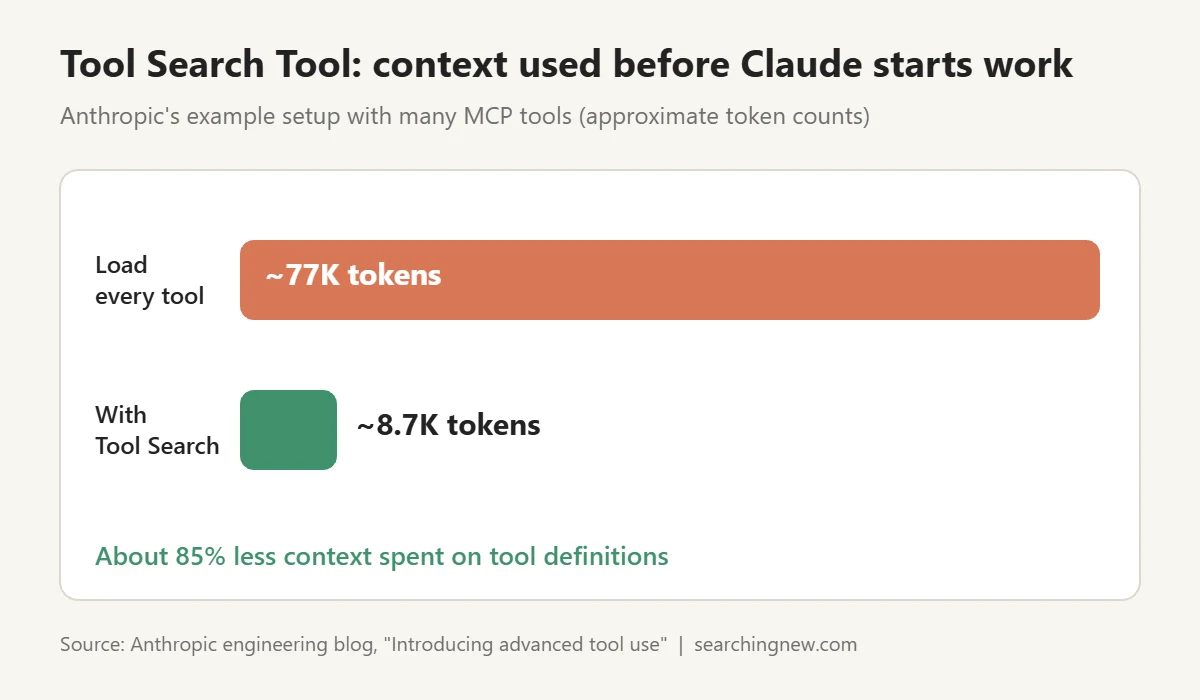
In Anthropic’s example, a setup with many MCP tools used about 77K tokens of context before any work started. With tool search, that dropped to about 8.7K tokens, roughly 85% less. Tool selection accuracy also went up in their MCP tests: Claude Opus 4 improved from 49% to 74%, and Opus 4.5 from 79.5% to 88.1%.
Two search types
- Regex (
tool_search_tool_regex_20251119): Claude writes a search pattern like"order.*status". Good when your tool names follow a clear pattern. - BM25 (
tool_search_tool_bm25_20251119): Claude searches in natural language, like “find a tool to track a parcel”. Good when tool names are less predictable.
You can also build your own search, for example with embeddings, and return the results to Claude.
Tool Search Tool example (Python)
Here the search tool is always loaded and a weather tool is deferred:
import anthropic

client = anthropic.Anthropic()

response = client.messages.create(
    model="claude-opus-5-5",
    max_tokens=2048,
    messages=[{"role": "user", "content": "What is the weather in Chennai?"}],
    tools=[
        {"type": "tool_search_tool_regex_20251119", "name": "tool_search_tool_regex"},
        {
            "name": "get_weather",
            "description": "Get the current weather for a city",
            "input_schema": {
                "type": "object",
                "properties": {"location": {"type": "string"}},
                "required": ["location"],
            },
            "defer_loading": True,
        },
    ],
)
Rules to remember
- You still send every tool definition in the request. Deferred tools are just kept out of Claude’s context until found.
- At least one tool must stay non-deferred, or you get a 400 error. Keep your 3 to 5 most-used tools loaded.
- Never set
defer_loadingon the search tool itself. - A deferred tool can’t also have
cache_control. Put your prompt cache breakpoint on a non-deferred tool. - You can defer up to 10,000 tools in one request.
When to skip tool search
If you have fewer than about 10 tools, compact descriptions, or tools that are used in almost every request, just load them normally. Tool search adds a small extra search step, which only pays off when the tool library is large.
2. Programmatic Tool Calling: let code do the heavy lifting
With normal tool calling, each call is a round trip: Claude asks for a tool, your app runs it, the full result goes back into the conversation, and Claude decides the next step. If a task needs 20 lookups, that’s 20 round trips and 20 full results stuffed into the context.
Programmatic Tool Calling changes this. Claude writes a small Python script that calls your tools inside a code execution sandbox. The script loops, filters and adds up the results, and only the final output goes back to Claude.
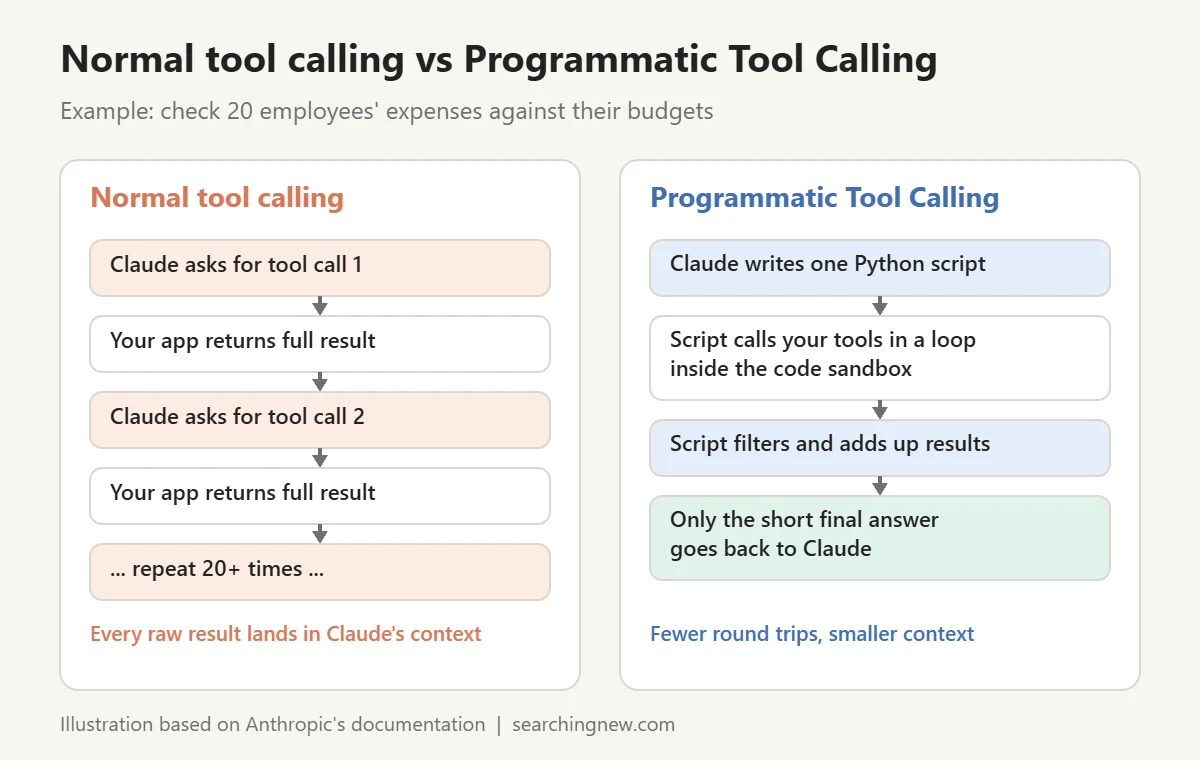
Anthropic’s example is a budget check: find which of 20 employees went over their travel budget. Instead of reading hundreds of kilobytes of expense records, Claude gets back only the few employees who crossed their limit. Anthropic reports that on complex research tasks, average token use fell from 43,588 to 27,297, about 37% less. Claude for Excel uses this approach to work on spreadsheets with thousands of rows.
Programmatic Tool Calling example (Python)
You add the code execution tool and tell your own tool that it can be called from code using allowed_callers:
tools = [
    {"type": "code_execution_20260120", "name": "code_execution"},
    {
        "name": "query_database",
        "description": "Run a SQL query on the sales database. Returns rows as JSON objects.",
        "input_schema": {
            "type": "object",
            "properties": {"sql": {"type": "string"}},
            "required": ["sql"],
        },
        "allowed_callers": ["code_execution_20260120"],
    },
]
The allowed_callers field takes three useful values:
["direct"]: the default. Claude calls the tool the normal way.["code_execution_20260120"]: Claude calls it only from code.["direct", "code_execution_20260120"]: either way. Anthropic suggests picking one for each tool instead.
Limits of Programmatic Tool Calling
- It needs the code execution tool version
code_execution_20260120or later. - Tools from the MCP connector can’t be called from code.
- Tools with
strict: trueare not supported, and neither isdisable_parallel_tool_use. - When you reply to pending code calls, your message must contain only
tool_resultblocks (no extra text), and you must pass thecontainerID. - A pending call times out after about 4 minutes, so your app should answer quickly.
- It is not eligible for zero data retention (ZDR), which matters if you handle sensitive customer data.
Skip it for single, simple lookups where Claude should read every result itself. Anthropic’s docs note that simple step-by-step workflows don’t gain much.
3. Tool Use Examples: show Claude the right format
A JSON schema says what type each field is, but not how real values should look. Should a date be 25-11-2026 or 2026-11-25? Should a phone number include +91? When should an optional field be left empty? Tool Use Examples answer these questions by adding sample inputs to the tool definition with input_examples.
Here is an example for an Indian e-commerce support bot that books a parcel pickup:
{
  "name": "schedule_pickup",
  "description": "Book a courier pickup for a return order",
  "input_schema": {
    "type": "object",
    "properties": {
      "order_id": {"type": "string"},
      "pickup_date": {"type": "string", "description": "Date in YYYY-MM-DD"},
      "phone": {"type": "string"},
      "pincode": {"type": "string"},
      "notes": {"type": "string"}
    },
    "required": ["order_id", "pickup_date", "phone", "pincode"]
  },
  "input_examples": [
    {"order_id": "ORD-48213", "pickup_date": "2026-12-02",
     "phone": "+919876543210", "pincode": "600040",
     "notes": "Call before arriving, gate code 12"},
    {"order_id": "ORD-50977", "pickup_date": "2026-12-03",
     "phone": "+919123456780", "pincode": "560034"}
  ]
}
The second example leaves out notes, which teaches Claude that the field is optional. In Anthropic’s internal testing on complex parameter handling, accuracy went from 72% to 90% with examples.
Tips for good examples
- Every example must match your
input_schema. An invalid example usually returns a 400 error. - Use 1 to 5 realistic, varied examples per tool. Fake values like “test123” teach nothing.
- Examples cost input tokens: roughly 100 tokens for a flat example and 200 for a nested one.
- Skip them for simple tools or standard formats like emails and URLs. A clear description still matters more.
Which feature should you use first?
| Your problem | Start with |
|---|---|
| Tool definitions use more than about 10K tokens, or you connect several MCP servers | Tool Search Tool |
| Claude picks the wrong tool from a big list | Tool Search Tool + clearer tool names |
| Tool results are large and you only need totals or filtered rows | Programmatic Tool Calling |
| Tasks need 3 or more dependent calls or the same call for many items | Programmatic Tool Calling |
| Tool inputs come in the wrong format (dates, IDs, nested objects) | Tool Use Examples |
| Fewer than 10 simple tools, all used often | Normal tool use is fine |
Does advanced tool use work in Claude Code?
Yes, in part. Claude Code and the Claude Agent SDK have their own tool search for MCP tools. It is on by default, so when you connect many MCP servers, tool definitions are loaded through search instead of all at once. You can control it with the ENABLE_TOOL_SEARCH environment variable:
auto:N: turn on tool search when tool definitions reach N% of the context (for exampleauto:5).false: turn it off and load all tool definitions on every turn. This can be faster if you only have a few tools.
Programmatic Tool Calling and Tool Use Examples are API features. You use them when you build your own app or agent on the Claude API.
Where you can use these features
- Tool Search Tool: Messages API on supported Claude 4.5 and newer models, including Opus 5.5, Sonnet 5.5 and Haiku 5.5. On Amazon Bedrock it works through the InvokeModel API, not the Converse API. It is eligible for zero data retention.
- Programmatic Tool Calling: Claude API, Claude Platform on AWS, Claude on Google Cloud (Anthropic managed) and Microsoft Foundry. Supported on Opus and Sonnet 4.5 and newer, Haiku 5.5 and others. Claude Haiku 4.5 does not support it.
- Tool Use Examples: works on your own (user-defined) tools and some Anthropic-defined client tools.
When these features launched, they needed the beta header advanced-tool-use-2025-11-20. The current Anthropic docs show tool search and programmatic tool calling requests without a special header, so follow the latest docs for your SDK version.
How to get started with Claude advanced tool use
- Create an API key in the Claude Console and install the SDK (
pip install anthropicfor Python). - Measure first. Check how many input tokens your tool definitions use and where Claude makes mistakes. This tells you which feature to try.
- Clean up tool names and descriptions. Tool search matches against them. Use prefixes like
github_list_prsorcrm_get_customer. - Add one feature at a time. For example, defer all but your top 3 to 5 tools and compare token use and accuracy.
- Document return formats. For programmatic calling, describe what each tool returns so Claude writes correct parsing code.
- Add a line to your system prompt telling Claude it can search for tools, so it knows to look when a needed tool isn’t visible.
Common errors and how to fix them
| Error or symptom | Cause | Fix |
|---|---|---|
All tools cannot be deferred (400) | Every tool has defer_loading: true | Keep at least one tool loaded |
Tool reference 'x' not found (400) | A tool was found but its definition isn’t in the request | Send every tool definition on each request |
400 error with cache_control | Cache breakpoint set on a deferred tool | Move cache_control to a non-deferred tool |
| Search returns no tools | Vague tool names or descriptions | Rename tools with clear keywords; try BM25 search |
invalid_tool_input from regex search | Bad pattern or pattern over 200 characters | Switch to BM25 or simplify tool names |
Code calls fail with TimeoutError | Your app took more than about 4 minutes to return the result | Speed up the tool or split the work |
Circular $ref detected (400) | A recursive schema on a tool callable from code | Keep that tool direct-only or flatten the schema |
Common mistakes to avoid
- Deferring your most-used tools. Claude then has to search for them every time, adding steps for no gain.
- Treating
allowed_callersas security. It guides Claude, but it is not a security boundary. Your app should still handle a direct call to any tool you defined. - Returning images from code-called tools. Results for programmatic calls must be text. Image and document blocks are rejected.
- Adding examples that break the schema. Check each example yourself before sending.
- Turning everything on at once. You won’t know which change helped. Add features one by one.
Frequently asked questions
What is advanced tool use in Claude?
It is a group of three Claude API features: the Tool Search Tool, Programmatic Tool Calling and Tool Use Examples. Together they help Claude use large tool libraries with fewer tokens and better accuracy.
Can I use advanced tool use in the Claude app?
These are developer features for the Claude API. You don’t switch them on in the Claude chat app. Claude Code users get MCP tool search built in.
Does tool search cost extra?
Tool search isn’t billed as a separate server tool. The tool definitions it loads count as normal input tokens. Programmatic tool calling is priced the same as code execution, and tool results handled inside the script don’t count toward your input or output tokens.
Is programmatic tool calling the same as the code execution tool?
Not exactly. Programmatic tool calling runs inside the code execution tool, but it adds the ability for Claude’s code to call your own tools. Plain code execution only runs code on data Claude already has.
What does “Claude reached its tool-use limit for this turn” mean?
That message appears in the Claude app when one reply has used up the number of tool calls allowed in a single turn. It is not your plan’s usage limit. Click Continue or send a short message like “continue”, and Claude picks up where it stopped.
How many tools can Claude handle with tool search?
Up to 10,000 deferred tools per request. Each search returns up to 5 tools by default.
Final verdict
Claude advanced tool use is worth learning if you build agents that connect to many apps or crunch a lot of data. Tool search saves the most when your tool list is long. Programmatic tool calling shines when results are big and you only need the summary. Tool use examples are the cheapest fix when Claude keeps getting input formats wrong.
If your app has a few simple tools, normal tool use is still the simpler choice. Start with your biggest pain point, measure the change, and build from there. To see how Claude compares with other assistants for everyday work, read our ChatGPT vs Gemini vs Claude comparison, our pick of the best AI assistant, and our explainer on Claude Mythos 5.2.
Sources
- Anthropic: Introducing advanced tool use on the Claude Developer Platform
- Claude Docs: Tool search tool
- Claude Docs: Programmatic tool calling
- Claude Docs: Define tools (tool use examples)