
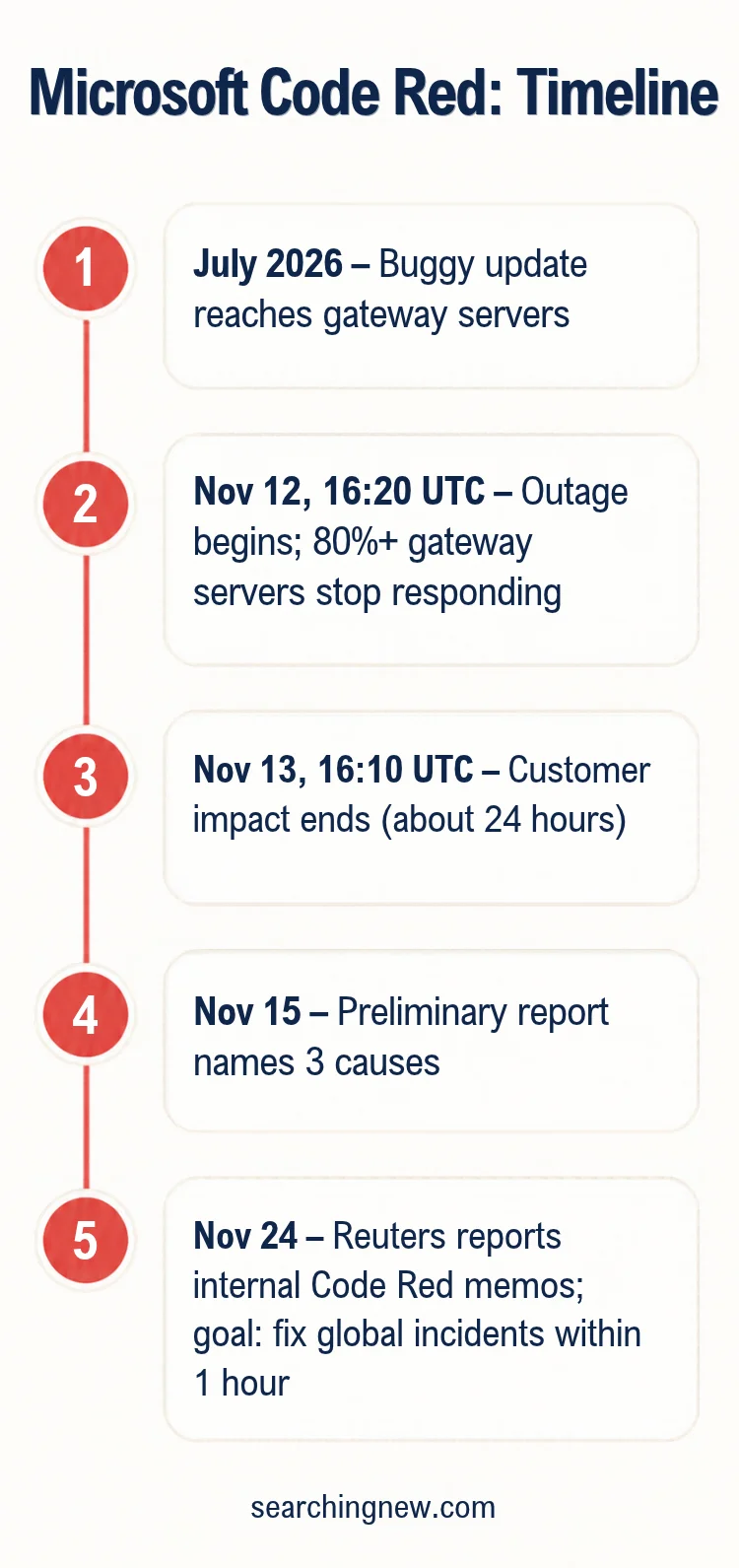
Microsoft Code Red is the name of an internal emergency push Microsoft started after its Microsoft 365 services went down for about 24 hours on November 12–13, 2026. Outlook, Exchange Online, Teams, Copilot and other apps stopped working for people in many countries. Internal memos, first reported by Reuters on November 24, show Microsoft now treats fixing this as its highest-priority engineering work, with a new goal: recover from any future worldwide incident within one hour.
Below is a plain-English look at what “Code Red” means at Microsoft, what actually broke, what the company says it will change, and what it means for you if you use Outlook or Teams every day.
What Does “Code Red” Mean at Microsoft?
“Code Red” is not a product or a public program. It is a label used inside the company to say: drop other work, this problem comes first. In his memo to staff, Jason Henderson, President of M365 Core, wrote that “Code Red means that this is the highest priority work for our team.”
In practice, that means:
- Daily meetings between Henderson and the Substrate leadership team (Substrate is the shared backend behind Exchange Online and other Microsoft 365 services).
- Weekly reviews to track progress on the fixes.
- Engineers moved onto reliability work instead of new features.
Henderson called the November event the “most customer-impacting incident in the history of Exchange Online.”
What Happened: The 24-Hour Microsoft 365 Outage
According to Microsoft’s preliminary post-incident report, customers were affected from 4:20 PM UTC on Thursday, November 12 to 4:10 PM UTC on Friday, November 13, 2026. Some services kept recovering into November 14.
Services hit included:
- Exchange Online and Outlook (email could not load or was badly delayed)
- Microsoft Teams
- SharePoint Online
- Microsoft 365 Copilot
- Defender XDR and several other Microsoft 365 services
The people affected were not just office workers. Reuters reported disruption for governments from Australia and Japan to the United States, delays at trading firms, and broken airline communications. Microsoft said the outage was not caused by a cyberattack or by AI agents.
What Caused the Outage? (Explained Simply)
Think of Microsoft 365 as a big building with a set of front doors. Every email request to Exchange Online goes through those doors first. Microsoft calls them the networking gateway. On November 12, the doors jammed.
Microsoft says three things lined up at the same time:
- A hidden bug from July. A Windows-level update made only for these gateway servers ran fine for over three months. But under certain traffic, it could make servers lock up. The bug was worse on newer machines with more CPU cores.
- Extra traffic. About 15 hours before the outage, Teams traffic was automatically shifted onto the same gateway that Exchange Online uses.
- Less capacity. Nearly 14% of gateway capacity was already offline because of a separate, unrelated problem.
When US traffic peaked, the first servers froze. Their traffic moved to other servers running the same code, and those froze too, like dominoes. Microsoft says the problem spread across its fleet in under two hours, and at the worst point more than 80% of gateway servers stopped responding.
Recovery was slow for two reasons. Every time servers came back, the backlog of waiting traffic overloaded them again. And while Teams, SharePoint and OneDrive could switch to other routes, Exchange Online could not move away from this gateway “for scale reasons.”
Why Testing Did Not Catch It
Microsoft’s report says its normal load testing missed the issue because the lab used a different traffic mix and less powerful hardware than the real servers. In an interview with CNBC on November 18, CEO Satya Nadella admitted Microsoft should have caught it during testing. At Ignite and again in New York, he apologised to customers, saying he was “extremely sorry.”
What Microsoft’s Code Red Plan Includes
A second memo, from Amanda Silver, corporate vice president for M365 Core and Work IQ, described the response as a “fog of war.” Responders sent more than 11,000 messages across 11 separate Teams chats, while diagnostic data was spread across different internal tracking tools. That chaos is a big part of what Code Red is meant to fix.
Here is what the plan covers, based on the memos reported by Reuters:
| Goal or workstream | What it means in simple terms |
|---|---|
| Fix worldwide incidents within 1 hour | A global outage should be brought under control in about an hour, not a day. |
| Load shedding | When servers are overloaded, drop or delay some requests on purpose so the whole system does not crash. |
| Geographic traffic partitioning | Split traffic by region so a failure in one area cannot spread worldwide. |
| Faster recovery mechanisms | Bring servers back without the backlog knocking them over again. |
| AI agents for diagnostics | Use AI to read system health data faster and point engineers to the problem. |
| Urgent patches worldwide within 1 hour | Henderson said one recent urgent fix took “five to six days” to reach every server. He admitted, “we aren’t here yet.” |
Silver’s memo listed five workstreams in total. Load shedding, regional partitioning and faster recovery are the ones named publicly so far. Microsoft has also said it added capacity, improved monitoring and added safeguards so traffic redirection cannot trigger the same chain reaction.
One striking detail: Charles Lamanna, Microsoft’s EVP of Copilot, Agents and Platform, said at a Code Red review that the affected component had used up “roughly ten years’ worth of acceptable failures” in one incident. Most cloud services have an “error budget”, a small amount of downtime they are allowed each year. This outage burned through about a decade of it at once.
This Is Not Microsoft’s First “Code Red”
Search for “Microsoft Code Red” and you will find three very different things. Here is how they compare:
| Name | When | What it was |
|---|---|---|
| Code Red worm | July 2001 | A computer worm that attacked Microsoft IIS web servers. A patch existed a month before the attack. It helped push Microsoft toward its Trustworthy Computing effort. |
| “Copilot code red” | April 2026 | Analysts and media used this name for Satya Nadella’s push to fix Copilot’s performance and slow business adoption as competition from ChatGPT and Claude grew. |
| Microsoft 365 Code Red | November 2026 | The current internal alert to overhaul reliability and incident response after the 24-hour outage. |
Big tech uses the phrase often. Google declared a “code red” after ChatGPT launched in late 2022, and OpenAI’s Sam Altman declared one in December 2025 to respond to Google’s Gemini. The difference this time is that Microsoft’s Code Red is about keeping basic services online, not about winning an AI race.
If you want to see how Microsoft’s AI assistant compares with its rivals, read our ChatGPT vs Gemini vs Claude comparison or our list of the best AI assistants.
What Microsoft Code Red Means for Regular Users
You do not need to change anything on your own PC or phone. Microsoft has said there is nothing to fix on your device. But the outage is a good reminder of a few practical habits.
If You Sent Important Email on November 12–13
- Check that key messages actually arrived. Microsoft extended the delivery window so delayed email was not bounced, but delays were long.
- Look in your Outbox. Desktop Outlook usually holds messages there until the connection returns. Mobile apps may have simply failed to send.
How to Check if Microsoft 365 Is Down
- Open the public status page at status.cloud.microsoft.
- Check the Microsoft 365 Status account on X for live updates.
- If you are an admin, open Health > Service health in the Microsoft 365 admin center. The November incidents were tracked as EX1550543 and MO1550821.
Simple Backup Habits
- Keep a phone number or a second messaging app for urgent work contacts.
- Use desktop Outlook in cached mode so you can still read recent mail offline.
- Watch out for phishing after big outages. Scammers often send fake “Microsoft account problem” emails while people are confused.
Common Mistakes During an Outage
- Reinstalling Office or resetting your PC. When the problem is on Microsoft’s side, this wastes time and does not help.
- Re-sending the same email again and again. Once service returns, all copies may be delivered.
- Trusting viral “statements”. During the outage, a fake apology credited to Bill Gates and Satya Nadella spread online. Stick to Microsoft’s official channels.
What It Means for Businesses and IT Teams
For companies, the biggest lesson is how much depends on one service. Exchange Online is tied into Teams, Copilot, calendars and security tools. When its front door failed, a lot of work stopped with it.
- Write down an outage plan: who to call, which backup chat tool to use, and how to reach customers.
- Read Microsoft’s final post-incident report in the admin center and check whether your service credits under the SLA apply.
- Keep an eye on whether Microsoft actually hits the one-hour recovery goal. Henderson’s own memo says the company is not there yet.
This also comes at a time of big internal change at Microsoft. We covered that in our post on Microsoft’s voluntary exit offer and layoffs.
Our Take
Declaring a Code Red is the right signal. Microsoft is being unusually open about what went wrong, from the July bug to the messy response with thousands of chat messages. The goals are clear and measurable: one hour to recover, one hour to ship urgent fixes.
The real test is what happens next time something breaks. Goals in a memo are easy to write. Splitting traffic by region and removing Exchange Online’s single front door is hard engineering that takes months. Until then, it is smart to keep a simple backup plan for email and chat, whether you run a company or just rely on Outlook for your job.
Frequently Asked Questions
What is Code Red in Microsoft?
It is Microsoft’s internal top-priority alert. The current Code Red, started in November 2026, focuses on stopping major Microsoft 365 outages and fixing them much faster.
Did Microsoft really issue a Code Red?
Yes. Reuters reviewed internal memos from M365 Core President Jason Henderson and CVP Amanda Silver describing the Code Red. Microsoft said in a statement that its “work doesn’t end when service is restored.”
What caused the Microsoft 365 outage in November 2026?
A hidden bug in a July update to Microsoft 365’s networking gateway servers, combined with extra Teams traffic and about 14% of gateway capacity already offline. It was not a cyberattack.
How long did the outage last?
Microsoft’s report puts customer impact at just under 24 hours, from 4:20 PM UTC on November 12 to 4:10 PM UTC on November 13, 2026.
Is Microsoft Code Red related to the Code Red virus?
No. The Code Red worm was a 2001 attack on Microsoft IIS web servers. The 2026 Code Red is an internal engineering alert and has nothing to do with malware.
Do I need to do anything on my computer?
No. The problem was on Microsoft’s servers. Just confirm that any important emails sent during the outage were delivered.
Sources
- Reuters report on the internal Code Red memos (via The Jerusalem Post)
- BleepingComputer: Microsoft says months-old bug caused global Microsoft 365 outage
- ITPro: Satya Nadella apologises to customers after the outage
- Microsoft Learn: How to check Microsoft 365 service health